Round Robin Distribution
Overview
This proposal outlines the best practices for implementing a Round Robin distribution workflow for handling automobile leads via the Logimeter Connect API. The workflow ensures efficient lead management by systematically distributing leads among sales agents and handling various call outcomes to maximise the chances of successful connections.
Scenario 1: Happy Path - Successful Call
This scenario illustrates a sample successful connection between the Designated Sales Executive(SE) and the customer.
- The lead is received and stored in the LMS system.
- The SE is identified as per the Round Robin Queue order.
- A Connect Request is fired with the SE and the Customer
- The Sales Executive’s number rings.
- The Sales Executive answers the call and presses 1 to confirm.
- The B-Leg is initiated, and the Customer is called.
- The Customer answers and the call is established.
- The LMS receives a successful Call Event and the lead is marked as closed.
Scenario 2: Designated Sales Executive (A-Leg) Didn't Answer
This scenario occurs when the Designated Sales Executive (SE) does not answer, leading to the lead jumping to the next agent in the Round Robin order.
- The Sales Executive does not answer the call.
- After 40 seconds, the call ends, and a call event with status “A NOT ANSWERED” is sent.
- The LMS receives the call event and updates the lead status.
- The LMS reattempts the lead (built for max retries).
Scenario 3: Designated Sales Executive (A-Leg) Answers but Customer (B-Leg) Didn't Answer
In this scenario, the Sales Executive answers, but the Customer does not, necessitating the lead to be retried.
- The Sales Executive answers the call and presses 1 to confirm.
- The Customer does not answer, and the call is disconnected.
- The LMS receives the Call Event and marks the lead for retry.
- The LMS reattempts the lead with the same Sales Executive or a different agent (built for max retries).
Configurable Options for B-Not Answered
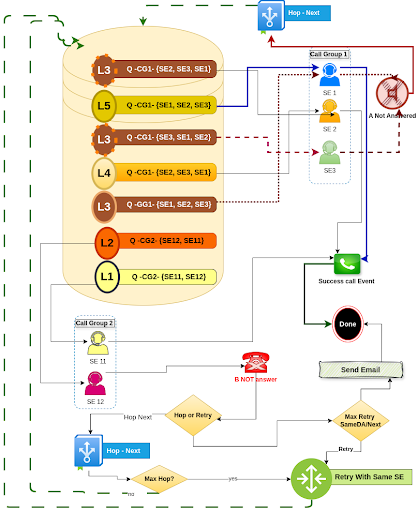
- Retry with the Same SE: Define the number of retry attempts with the same SE.
- Hop to Next SE: Option to move to the next agent if the Customer does not answer.
- Retry Timing: Configure the retry interval and the increase in retry intervals.
Key Concepts of this Workflow
Call Groups (CG)
- Groups of sales executives (SE) responsible for specific lead types.
- Call Group 1 handles New Car leads with SE1, SE2, and SE3.
- Call Group 2 handles Used Car leads with SE11 and SE12.
Leads (L)
- Incoming customer inquiries categorised by car type.
- Examples: L1, L2 (New Car leads), L3, L4, L5 (Used Car leads).
Queues (Q)
- Order in which leads are processed within a call group.
- Round Robin: Leads are assigned to available sales executives in a rotating order.
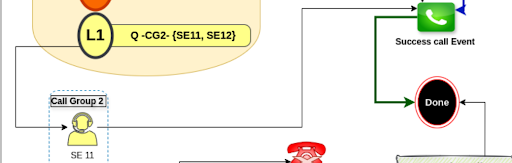
- Example: L1 - Q - CG2 - {SE11, SE12} indicates Lead 1 was assigned to Call Group 2 and processed by SE11 based on the queue order.
Workflow
- A lead (L) is received and assigned to the appropriate call group (CG1 or CG2) based on the car type.
- The lead enters a queue (Q) within the call group.
- The next available sales executive (SE) in the queue handles the lead.
- The SE contacts the customer.
- If the call is successful, a "Success Call Event" is generated.
Hence the lead is allocated to SE11. SE11 answers the call and then the Customer number is bridged.
In this instance the Customer answers and they had a successful call.
Once the call is completed, a success call event will be sent by Connect API to the partner.